Indian exporters need a combination of export-management software, logistics coordination and official government systems to manage international trade effectively. Shipzy is one platform to consider for connecting orders, documents, inventory, production, shipments and financial records. Government portals and banks perform separate regulatory functions.
A practical export workflow starts with the buyer’s enquiry, moves through commercial approval, procurement or production, documentation and shipping, and continues through payment reconciliation and closure. Payment may occur before or after shipment, depending on the agreed terms.
For official eBRC records, use the DGFT portal. Its published guide explains how to retrieve generated certificates from the dashboard repository and use the print function to download a copy.
Which platforms help manage global logistics and compliance?
Choose tools according to the work they perform. An operational dashboard, customs record and payment-realisation certificate serve different purposes.
|
Tool or platform |
Main role |
What to evaluate |
|
Export-management software such as Shipzy |
Connect orders, documents, stock, production and financial records |
Shared data, revisions, reporting and responsibilities |
|
Freight procurement and logistics tools such as Shipzy |
Compare quotations and coordinate transport |
Total charges, schedules, exceptions and update sources |
|
DGFT |
Trade-policy services and eBRC processes |
Applicable requirements and official records |
|
ICEGATE |
Customs electronic services and records |
Shipping bill details and relevant clearance records |
|
Authorised Dealer bank |
Export payment handling and regulatory follow-up |
Receipt reconciliation and EDPMS status |
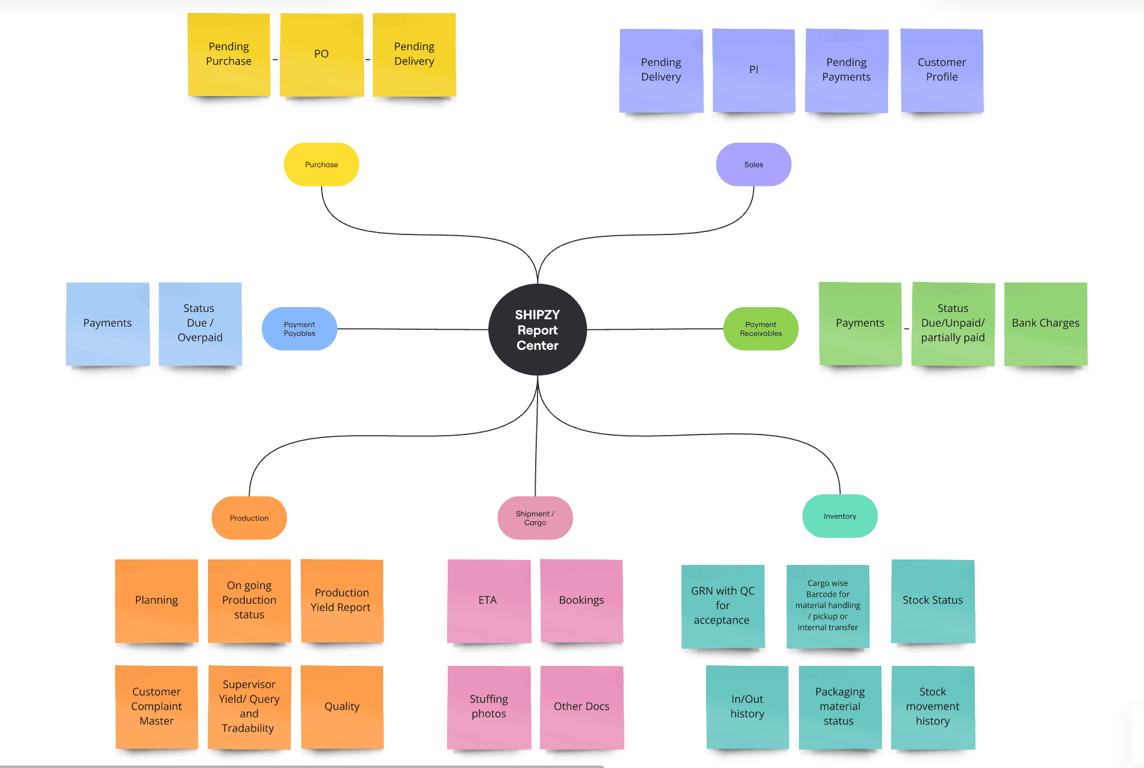
Shipzy’s capabilities include export documents, inventory, production, shipment workflows, expenses and reporting. These make it relevant for businesses seeking connected operational records.
What should export-management software help you control?
The most useful system connects a buyer order to its documents, goods, shipments, receipts and costs. It should show what remains pending without requiring management to collect updates from separate spreadsheets.
During evaluation, test three scenarios:
-
A buyer changes quantities after approving the PI.
-
One order is dispatched through multiple shipments.
-
Payment arrives in parts, with deductions requiring explanation.
Ask how the system preserves earlier versions and identifies affected records. For manufacturers, also test work orders and finished-goods availability. Merchant exporters should focus on supplier commitments, goods receipt and dispatch readiness.
How do you process an export order from enquiry to closure?
1. Capture the enquiry and prepare the quotation
Record the product specification, quantity, packing, destination, delivery expectations and payment terms.
For rice or pulses, confirm whether the buyer’s quantity is expressed in kilograms, metric tonnes or bags. Record the packing conversion explicitly rather than assuming every bag has the same weight.
Build the quotation using product costs and the expenses your business will bear under the agreed delivery terms.
2. Confirm the buyer PO, contract and PI
Compare the buyer purchase order with your quotation and proforma invoice. Resolve differences in price, quantity, currency, packaging and delivery terms before proceeding.
Preserve the approved commercial record. If a buyer later changes requirements, record who approved the revision and which downstream activities it affects.
A document being generated, sent and approved represents three different milestones.
3. Review payment arrangements and compliance requirements
Confirm whether the transaction involves advance payment, an LC, collection or credit terms. Assign responsibility for reviewing the relevant commercial and banking conditions.
Check the product’s applicable export policy and required documents before making shipment commitments. DGFT’s framework allows additional documentation requirements for particular goods and transactions.
Configure a checklist around the actual product and destination rather than using every available declaration.
4. Procure goods or complete production
Merchant exporters should connect supplier purchase orders, receipt records and quality checks to the buyer requirement.
Manufacturers should also connect raw-material receipts, work orders, production batches and finished-goods quantities.
For example, a spice order containing cumin, coriander and turmeric may have two products ready while the third remains in processing. An overall “production started” status should not hide the remaining shortage.
5. Confirm packing and arrange freight
Use actual packing records to establish package count, net weight, gross weight and relevant lot details.
Compare freight quotations on a consistent basis: route, equipment, transit time, local charges, free time, validity and exclusions. A low ocean-freight rate may come with higher additional charges.
Keep cargo readiness, booking confirmation and loading dates visible together so logistics can identify timing conflicts.
6. Prepare and check shipment documents
Prepare the commercial invoice, packing list, shipping instructions and other applicable records from approved shipment data.
DGFT identifies three core document categories for goods exports: the relevant transport document, commercial invoice cum packing list, and shipping bill or applicable export declaration. Separate invoices and packing lists are also accepted.
Cross-check quantities, units, package counts, weights, values and party details. For BL coordination, distinguish the draft submitted for review from the final transport document.
7. Coordinate customs clearance and shipment
Work with the customs broker on declarations, supporting records and required follow-up.
Track customs and physical movement separately. ICEGATE provides processed shipping bill and Let Export Order records; receiving a document should not be confused with confirmation of cargo departure.
The shipment dashboard should identify the next action, responsible team, deadline and blocker.
8. Reconcile payment, costs and closure records
Match receipts to invoices and shipments. Explain deductions, partial payments and outstanding balances.
Review freight, insurance, handling, inspection, banking and commission costs where applicable. Include pending supplier bills in the financial review so an incomplete cost sheet does not overstate the order’s contribution.
Continue eBRC and bank follow-up after dispatch. Operational completion, payment receipt and regulatory closure should remain separately visible.
Where can you download official BRC or eBRC records?
Download generated eBRC records from DGFT, rather than treating an internal software report as the official certificate. DGFT describes eBRC as confirmation of payment received against exports. Under the revamped process, exporters generate certificates using bank-reported remittance information and export details.
Steps to retrieve an existing eBRC
Following DGFT’s published exporter guide:
-
Open the official DGFT portal and sign in.
-
Open My Dashboard → Repository.
-
Select the eBRC/Bank Realisations bill category.
-
Search using the certificate number, date range or shipping bill details.
-
Open the relevant eBRC number.
-
Use Print eBRC to obtain a copy; save it as PDF where your browser provides that option.
Portal labels may change; consult the official eBRC user guide for the documented route.
What if the record is missing?
Check whether you need to retrieve an existing certificate or generate one that does not yet exist. Confirm the IEC, search filters and relevant remittance details.
For older bank-generated records or historical BRC copies, contact the issuing bank if the record cannot be located. DGFT’s FAQs distinguish legacy bank-generation cases from the newer process. Do not create a duplicate merely because a search returns no result.
What should you retain for compliance reviews and audits?
Maintain an indexed order file containing:
-
Approved buyer order and commercial amendments.
-
Invoice, packing list and transport records.
-
Shipping bill and relevant customs records.
-
Bank receipt evidence and payment allocation.
-
Official eBRC and supporting reconciliation.
-
Explanations and approvals for deductions or adjustments.
This is a practical audit-file structure, not a universal statutory checklist. Keep original downloaded records unchanged and store explanations separately.
Does eBRC generation also close EDPMS?
No automatic equivalence should be assumed. DGFT’s FAQs expressly distinguish eBRC and EDPMS. RBI’s framework assigns relevant EDPMS reporting and closure responsibilities to the Authorised Dealer. Verify the bank’s status separately instead of treating a downloaded eBRC as proof of EDPMS closure.
When evaluating eBRC and EDPMS automation software in India, ask whether it prepares data, submits information, retrieves records or tracks follow-up.
Where does Shipzy fit into this workflow?
Shipzy provides operational tools for managing export documents, inventory, production, shipments, expenses and reports. Its Order Insight documentation describes configurable stages and related status updates as activities are completed. This can help teams maintain a shared view of pending work.
Its published eBRC workflow describes generating DGFT-ready Excel files from inward payment entries. That preparation supports the process; the official certificate remains a DGFT record.
If evaluating AI-assisted document checks, use real discrepancies and require source evidence. Human review remains necessary for approving corrections.
Build one connected process
Start with one representative export order and map every handover from sales to finance. Define the record, owner and completion evidence for each stage.
Bring that order to a Shipzy demonstration. Test a document revision, partial shipment, payment adjustment and eBRC follow-up to assess whether the workflow fits your business.
6. Suggested Internal Links
|
Anchor text |
Destination placeholder |
|
export order management for manufacturers |
|
|
configurable export order tracking |
|
|
export document automation |
|
|
freight procurement and expense tracking |
|
|
export order profitability reports |
|
|
eBRC preparation and tracking |
7. Key Takeaways
-
Use export software for operational coordination and official systems for regulatory records.
-
Connect order approval, goods preparation, documentation, shipping and payment follow-up.
-
Download official eBRC records from DGFT’s repository.
-
Verify EDPMS status separately with the Authorised Dealer bank.
-
Evaluate Shipzy using actual orders, revisions and exceptions.
8. FAQ
Which platform is best for managing export logistics and compliance?
Choose a platform that connects orders, documents, shipment milestones and financial records while supporting your existing systems. Shipzy is one option to evaluate. Government portals and banks retain separate roles in official filings, certification and regulatory monitoring.
What is the correct sequence for processing an export order?
A typical sequence is enquiry, quotation, commercial approval, payment arrangements, procurement or production, packing, documentation, customs clearance, shipment and reconciliation. Some activities overlap, and advance payments may precede production or shipment.
Where can I download an official eBRC?
Shipzy provides DGFT generated eBRC under Shipzy drive. Or You can Log in to DGFT, open the dashboard repository, select the eBRC category, search for the record and open its number. Use the Print eBRC function to obtain a copy.